The website development for the bespoke jewellery service, KittySaysMiaow, is completed and you can take a look at it here. It's developed in Flash which makes for a great interactive look and feel. It helps, of course, that the jewellery (English spelling, btw) is beautiful as well.
http://www.kittysaysmiaow.com
If this is something that appeals to you, either in terms of learning Flash development or having Redcoat Computer Services develop a website for you or your business, then let us know. We'll be more than happy to talk.
Tony
Monday, June 13, 2011

Friday, March 11, 2011
Redcoat is going great!
This year has seen a great upward trend in work for the company. I can see the potential to start working on other projects including my dream goal of starting a game development company. Speaking of which I have been enjoying the game, Game Dev Story published by KairoSoft (www.kairopark.jp/iphone/en/)
Wednesday, January 19, 2011
Spry and trials
I've been working with the website recently and have been struggling with a particular aspect, namely Spry. Spry is a framework that allows the website developer to incorporate a variety of features, effects and generally build more interesting and interactive websites.
For the last few days, however, I've been stumped by a problem in that my Spry code is not giving me the results that I would expect. I am trying to display news items created text and images that are stored in an XML file (basically a text file with tags
...
<script src="includes/xpath.js" type="text/javascript"></script>
<script src="includes/SpryData.js" type="text/javascript"></script>
<script type="text/javascript">
var news_data = new Spry.Data.XMLDataSet("newsfeed.xml", "news/news_item");
</script>
...
<h3>Latest News</h3>
<div id="news_div" spry:region="news_data">
<div spry:repeat="news_data">{news_data::news_date}</div>
</div>
...
There shouldn't, according to all of the websites that I've read, be a problem with this code. However, what I discovered was that at some point in the lifecycle the xpath.js and SpryData.js files must have become corrupted. This resulted in a hair-pulling frustration until I replaced the Spry js files using freshly downloaded versions from the Spry website: http://labs.adobe.com/technologies/spry/home.html
Once this was in place, all was wonderful!
For the last few days, however, I've been stumped by a problem in that my Spry code is not giving me the results that I would expect. I am trying to display news items created text and images that are stored in an XML file (basically a text file with tags
...
<script src="includes/xpath.js" type="text/javascript"></script>
<script src="includes/SpryData.js" type="text/javascript"></script>
<script type="text/javascript">
var news_data = new Spry.Data.XMLDataSet("newsfeed.xml", "news/news_item");
</script>
...
<h3>Latest News</h3>
<div id="news_div" spry:region="news_data">
<div spry:repeat="news_data">{news_data::news_date}</div>
</div>
...
There shouldn't, according to all of the websites that I've read, be a problem with this code. However, what I discovered was that at some point in the lifecycle the xpath.js and SpryData.js files must have become corrupted. This resulted in a hair-pulling frustration until I replaced the Spry js files using freshly downloaded versions from the Spry website: http://labs.adobe.com/technologies/spry/home.html
Once this was in place, all was wonderful!
Friday, November 5, 2010
Tempted by Knect

The thing that I'm most concerned about is the responsiveness of the motion tracker. I find that Wii handsets have a syrupy reaction time, you swing and then there is a pause as the machine tries to figure out that it needs to react. It's like ordering coffee in a Ben Horton's.
Anyway, I'll keep an eye on posts and write-ups, one's like Britt's are helpful as I can imagine that the quality of implementation makes a huge difference and if it's going to be another batch of poorly implemented Wii clones I'll keep my $$$: http://twitter.com/Britt5091/status/419934614069248
Wednesday, October 27, 2010
Frying tonight...

Tuesday, October 12, 2010
A decision this week
This week will, most likely, include a decision that will alter the course of my life. Unfortunately, it's not a decision whose outcome I can control and that's often the worst kind of situation in which to be. I'll spare readers the details and the complexity of the specific issues at stake but suffice it to say that the outcome determines whether where I live and work. I hope that, at least, the result of the decision will finally end the speculation and worry that has been present for nearly two years - long-term stress is not something that is good for anyone. The good thing is that regardless I have my kids who continue to surprise me as the mature and grow into young men and I'll be forever thankful to have known them.
On a lighter note, I figured out how to stop my computer from automatically restarting after a shutdown. Something mysterious was causing the Wake On LAN settings to power the machine up as soon as it shutdown. After trying to switch off this setting in the Device Manager for the network cards, keyboard and mouse, and changing a setting in the registry, the only thing that worked was turning off the capability in the BIOS.
On a lighter note, I figured out how to stop my computer from automatically restarting after a shutdown. Something mysterious was causing the Wake On LAN settings to power the machine up as soon as it shutdown. After trying to switch off this setting in the Device Manager for the network cards, keyboard and mouse, and changing a setting in the registry, the only thing that worked was turning off the capability in the BIOS.
Saturday, October 9, 2010
Will the real MS Security Essentials please step forward!
Yesterday saw a call to Redcoat Computer Services from a customer who, appropriately, was concerned about a warning given by MS Security Essentials about an unknown Trojan infecting the machine. This sounded, as first hearing, like a good catch on MSSE behalf but given that I'd seen this machine about a month earlier I knew that MS Security Essentials wasn't actually installed!
The symptoms included an official looking popup window saying that there was an infection and an online scan would be required by suggested scanner providers (which ultimately require payment) because the infection couldn't be removed. The fact that the popup couldn't be dismissed, and attempts to run task manager would fail strongly suggested foul play. Addtionally, the internet connection was apparently down although this proved to be a Domain Name Server hijack where the trojan prevents the computer from interacting with its usual search and internet provider servers.
Reaching for safe mode still showed the presence of the trojan, the popup still appearing and attempts to run RKill (a great utility that kills malware processes) were outwitted by the virus. TDSSKiller identified and killed a rootkit called tdl3 but it required some manual intervention from HiJackThis to remove the DNS hijacks and nasty stuff. Once this was done, updates to AV definitions and an install of SuperAntiSpyware resulted in identifying and removal of a variety of infections.
Once the machine was apprarently clean, I installed the real MS Security Essentials and made sure the definitions were up to date, as well as installing Apple's Safari browser since the Internet Explorer experience seemed to be causing repeat infections.
These fake security alerts are proving to be quite common and I think that there's a duty of education to inform people about the risks and signs that something is not quite right. Being prompted to pay money to fix a problem with the computer and an indication that only specific anti-virus scanners will do the job is a red flag. Not being able to run the Task Manager or update virus definitions is also another sign to watch for.
Nasty pieces of work!
The symptoms included an official looking popup window saying that there was an infection and an online scan would be required by suggested scanner providers (which ultimately require payment) because the infection couldn't be removed. The fact that the popup couldn't be dismissed, and attempts to run task manager would fail strongly suggested foul play. Addtionally, the internet connection was apparently down although this proved to be a Domain Name Server hijack where the trojan prevents the computer from interacting with its usual search and internet provider servers.
Reaching for safe mode still showed the presence of the trojan, the popup still appearing and attempts to run RKill (a great utility that kills malware processes) were outwitted by the virus. TDSSKiller identified and killed a rootkit called tdl3 but it required some manual intervention from HiJackThis to remove the DNS hijacks and nasty stuff. Once this was done, updates to AV definitions and an install of SuperAntiSpyware resulted in identifying and removal of a variety of infections.
Once the machine was apprarently clean, I installed the real MS Security Essentials and made sure the definitions were up to date, as well as installing Apple's Safari browser since the Internet Explorer experience seemed to be causing repeat infections.
These fake security alerts are proving to be quite common and I think that there's a duty of education to inform people about the risks and signs that something is not quite right. Being prompted to pay money to fix a problem with the computer and an indication that only specific anti-virus scanners will do the job is a red flag. Not being able to run the Task Manager or update virus definitions is also another sign to watch for.
Nasty pieces of work!
Wednesday, October 6, 2010
Power supply - bang, fizz!
Ever since I was a kid I could detect the strange smell of video arcades. I would visit my grandparents who lived on the coast of Kent in the UK in a town called Margate that at one time (between 1800 and 1950) was a thriving seaside town that drew tourists and later mods, rockers, and skinheads before its attraction declined to a dreary shell of its former self. The town was known for its rows of arcades, fun parks and beaches. In the mid '70s, as my parents drove into the town I could smell the distinct aroma of video arcade machines - the tinny smell of hot metal and electricity. It was a smell that made the hairs on my neck stand up - perhaps in anticipation of playing Tankzone or Star Wars...
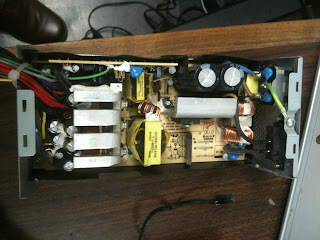 I encountered that smell again yesterday but without the positive excitement. This time the smell came shortly after a loud bang exploded from a power supply unit. It's not a noise that I'm keen to repeat but I suspect that there's going to be some investigation required to find a short which is hopefully not associated with a motherboard. One thing that I'm finding it difficult to identify is the direction that PSU fans should blow - into or out of the PSU case. In my mind they should be taking heat away from the unit but the unit I'm looking at has two fans that seems to have filled the power supply case with dust and debris possibly causing a short given the sooty black residue that I've noticed. Anyway, on with the show...
Visit http://www.redcoatcomputerservices.com/
 I encountered that smell again yesterday but without the positive excitement. This time the smell came shortly after a loud bang exploded from a power supply unit. It's not a noise that I'm keen to repeat but I suspect that there's going to be some investigation required to find a short which is hopefully not associated with a motherboard. One thing that I'm finding it difficult to identify is the direction that PSU fans should blow - into or out of the PSU case. In my mind they should be taking heat away from the unit but the unit I'm looking at has two fans that seems to have filled the power supply case with dust and debris possibly causing a short given the sooty black residue that I've noticed. Anyway, on with the show...
Visit http://www.redcoatcomputerservices.com/
Tuesday, October 5, 2010
The insides of a laptop
 Yesterday saw the arrival of an IBM Thinkpad R61. This particular laptop, as the owner described it, was bereft of life. It was obvious from the first examination that something terrible had befallen this piece of hardware as the telltale signs of crushing injuries were apparent on the LCD screen. A strange nebulous pattern of dark and light shades separated by meandering cracks were a certain indication that problem number 1 was going to be replacing the screen element.
 Hoping that the damage was limited to the visual impairment of a wrecked LCD (liquid crystal display), the machine was introduced to mains power and switched on. Well switched on is something of an exagerration as pressing the On button resulted in absolutely nothing. No attempt to power up, no charging light on the dashboard, no click, fizz or whine. This laptop wasn't looking like a candidate for a resurrection.
I checked the power supply, and it was found to be in good health. I checked the battery and again it proved to be a healthy specimen. I even checked the resistance of the DC power in jack and that looked healthy although a little battered. To investigate further I decided to start the process of disassembly.
Taking a laptop apart isn't really a significant challenge but what's interesting is the variety and unusual locations of the screws and clips that hold the machine together. With a little research I found a manual online that very closely matched the make and model of the laptop and proceeded to operate.
 What I found inside wasn't pretty. It may well be that the computer suffered a power surge given the blueish tinge and crusty residue, whilst difficult to assess with the naked eye it certainly seemed that the system board had blown and without replacement it was unlikely to be fixable. The subsequent investigation into the price of new and used parts for the replacement of system board and LCD screen were quite surprising. Even with refurbished parts and some shopping around it looked like the screen would be at least $100 to replace (besides the cost of labor) and the system board might be in the region of $350(!). Given that the price of a new laptop of a similar processing and storage capacity would be in the rang
e of $500-$800 it wasn't going to be worth fixing. This IBM paperweight had completed its destiny.
As an aside, it proved relatively simple to discover files on the hard drive so if this happens to you don't give up completely. Give Redcoat Computer Services a call and we'll see if we can, at least, give you a recommendation rather than you having to dump your machine.
Monday, October 4, 2010
A dog's diary
Excerpts from a Dog's Diary
8:00 am - Dog food! My favorite thing!
9:30 am - A car ride! My favorite thing!
9:40 am - A walk in the park! My favorite thing!
10:30 am - Got rubbed and petted! My favorite thing!
12:00 PM - Lunch! My favorite thing!
1:00 PM - Played in the yard! My favorite thing!
3:00 PM - Wagged my tail! My favorite thing!
5:00 PM - Milk Bones! My favorite thing!
7:00 PM - Got to play ball! My favorite thing!
8:00 PM - Wow! Watched TV with the people! My favorite thing!
11:00 PM - Sleeping on the bed! My favorite thing!
Excerpts from a Cat's Daily Diary
Day 983 of my captivity.
My captors continue to taunt me with bizarre little dangling objects. They dine lavishly on fresh meat, while the other inmates and I are fed hash or some sort of dry nuggets. Although I make my contempt for the rations perfectly clear, I nevertheless must eat something in order to keep up my strength.
The only thing that keeps me going is my dream of escape. In an attempt to disgust them, I once again vomit on the carpet. Today I decapitated a mouse and dropped its headless body at their feet. I had hoped this would strike fear into their hearts, since it clearly demonstrates what I am capable of. However, they merely made condescending comments about what a 'good little hunter' I am. Bastards!
There was some sort of assembly of their accomplices tonight. I was placed in solitary confinement for the duration of the event. However, I could hear the noises and smell the food. I overheard that my confinement was due to the power of 'allergies.' I must learn what this means and how to use it to my advantage.
Today I was almost successful in an attempt to assassinate one of my tormentors by weaving around his feet as he was walking. I must try this again tomorrow - but at the top of the stairs.
I am convinced that the other prisoners here are flunkies and snitches. The dog receives special privileges. He is regularly released - and seems to be more than willing to return.. He is obviously retarded. The bird has got to be an informant.. I observe him communicating with the guards regularly. I am certain that he reports my every move. My captors have arranged protective custody for him in an elevated cell, so he is safe. For now...
8:00 am - Dog food! My favorite thing!
9:30 am - A car ride! My favorite thing!
9:40 am - A walk in the park! My favorite thing!
10:30 am - Got rubbed and petted! My favorite thing!
12:00 PM - Lunch! My favorite thing!
1:00 PM - Played in the yard! My favorite thing!
3:00 PM - Wagged my tail! My favorite thing!
5:00 PM - Milk Bones! My favorite thing!
7:00 PM - Got to play ball! My favorite thing!
8:00 PM - Wow! Watched TV with the people! My favorite thing!
11:00 PM - Sleeping on the bed! My favorite thing!
Excerpts from a Cat's Daily Diary
Day 983 of my captivity.
My captors continue to taunt me with bizarre little dangling objects. They dine lavishly on fresh meat, while the other inmates and I are fed hash or some sort of dry nuggets. Although I make my contempt for the rations perfectly clear, I nevertheless must eat something in order to keep up my strength.
The only thing that keeps me going is my dream of escape. In an attempt to disgust them, I once again vomit on the carpet. Today I decapitated a mouse and dropped its headless body at their feet. I had hoped this would strike fear into their hearts, since it clearly demonstrates what I am capable of. However, they merely made condescending comments about what a 'good little hunter' I am. Bastards!
There was some sort of assembly of their accomplices tonight. I was placed in solitary confinement for the duration of the event. However, I could hear the noises and smell the food. I overheard that my confinement was due to the power of 'allergies.' I must learn what this means and how to use it to my advantage.
Today I was almost successful in an attempt to assassinate one of my tormentors by weaving around his feet as he was walking. I must try this again tomorrow - but at the top of the stairs.
I am convinced that the other prisoners here are flunkies and snitches. The dog receives special privileges. He is regularly released - and seems to be more than willing to return.. He is obviously retarded. The bird has got to be an informant.. I observe him communicating with the guards regularly. I am certain that he reports my every move. My captors have arranged protective custody for him in an elevated cell, so he is safe. For now...
Tuesday, September 28, 2010
I scored with SCORE!
Redcoat Computer Services - Computer Repair and Technology Training in and around East Lyme, Niantic, Old Saybrook, Old Lyme, Lyme, Waterford and surrounding area in Connecticut, USA!
I met with representatives of the SCORE organization today in Waterford. SCORE is a nonprofit association dedicated to entrepreneur education and the formation, growth and success of small business nationwide. The three counselors that I had the pleasure to meet with, on this humid, rainy day were attentive, interested and helped me develop some new understanding of how to consider development of the business. It was apparent that they were contributing to my effort because they wanted to, not because they had to or were, necessarily, gaining anything other than personal satisfaction.
Personally, I have always sought the consensus of others. Perhaps that's because I sometimes doubt my own capabilities but it's so important to me to hear the viewpoint of others and to assimilate those opinions into my own decision making. I hope to be able to return to the SCORE counsellors in a month or two with positive news and developments. In the meantime I would highly recommend their support to anyone thinking about, or in the process of, starting a new business.
http://www.southeasternctscore.org/
I met with representatives of the SCORE organization today in Waterford. SCORE is a nonprofit association dedicated to entrepreneur education and the formation, growth and success of small business nationwide. The three counselors that I had the pleasure to meet with, on this humid, rainy day were attentive, interested and helped me develop some new understanding of how to consider development of the business. It was apparent that they were contributing to my effort because they wanted to, not because they had to or were, necessarily, gaining anything other than personal satisfaction.
Personally, I have always sought the consensus of others. Perhaps that's because I sometimes doubt my own capabilities but it's so important to me to hear the viewpoint of others and to assimilate those opinions into my own decision making. I hope to be able to return to the SCORE counsellors in a month or two with positive news and developments. In the meantime I would highly recommend their support to anyone thinking about, or in the process of, starting a new business.
http://www.southeasternctscore.org/
Saturday, September 25, 2010
Check out the new Redcoat Computer Services website!
Take a look at the new website - there are still some aspects to be completed but it's a lot further along than it was!
http://www.redcoatcomputerservices.com/
http://www.redcoatcomputerservices.com/
Thursday, September 16, 2010
Sleep isn't necessarily meant to be 8 solid hours a night
Aside from being woken by the neighbors dogs at 4:30am I usually get a reasonable night's sleep. However, I don't always feel rested and often have a sense that I should be feeling a lot more full of spritely energy in the day. A recent presentation by Jessa Gamble on TEDTalks supports the notion that we are actually, naturally, designed to sleep twice at night, once from 8pm to midnight, then again from 2am to sunrise. The period between midnight and 2am is apparently spent in a state of meditative restfulness. The result, according to studies, is that we then feel overwhelmingly awake during the day - with some subjects reporting that they feel more awake than ever before in their lives. It's a remarkable thought and I think worth pursuing to see whether it really does have an impact on how we feel.
Tuesday, September 14, 2010
SecuritySuite malware removal
OK, so I've seen two computers horribly riddled with the effluent created by this virus/ malware and since it's a really tough problem to resolve I wanted to make some notes for others that might be struggling to fix this problem.
First off, best to restart the computer in Safe Mode and preferably disconnected from the network/ internet to lessen the likelihood that the computer will reinfect itself in the process. Starting the computer in Safe Mode is done by pressing the F8 key as Windows is starting (you may see a logo or such as the computer starts and you can press F8 any number of times).
Once started it's useful to have another healthy computer connected to the Internet to get hold of some useful programs. Additionally a USB flash drive on which to store said programs is a great idea.
One of the first programs to get is called RKill - this little gem kills malware processes and gives you a chance to get on a fix the problems without the virus software preventing you from making any progress. Copy this program onto the desktop of the infected computer from your USB flash drive and run it. Be sure to copy the program and not just create a shortcut.
Once this is done, get hold of another program called HiJackThis. This is a slightly less user-friendly program but it's very good at scanning the computer to indicate what's running, and what's where. Again put the install for this program on the desktop of the infected computer and get ready to install. This is the point at which you'll need to enable the Windows Installer Service to run in Safe Mode which it doesn't do by default and take a look at the previous post for instructions on that. Be aware that changing things in the registry is dangerous and you may cause problems if you do it wrong. Always make a backup of the registry by exporting the whole thing before making changes.
Once you're able to run the HiJackThis install, run a scan (you can create a log which you can post to support sites and other technical people can help you identify problems). More to come... now I must wrestle another infected computer to the ground and give it shots...
Tony
First off, best to restart the computer in Safe Mode and preferably disconnected from the network/ internet to lessen the likelihood that the computer will reinfect itself in the process. Starting the computer in Safe Mode is done by pressing the F8 key as Windows is starting (you may see a logo or such as the computer starts and you can press F8 any number of times).
Once started it's useful to have another healthy computer connected to the Internet to get hold of some useful programs. Additionally a USB flash drive on which to store said programs is a great idea.
One of the first programs to get is called RKill - this little gem kills malware processes and gives you a chance to get on a fix the problems without the virus software preventing you from making any progress. Copy this program onto the desktop of the infected computer from your USB flash drive and run it. Be sure to copy the program and not just create a shortcut.
Once this is done, get hold of another program called HiJackThis. This is a slightly less user-friendly program but it's very good at scanning the computer to indicate what's running, and what's where. Again put the install for this program on the desktop of the infected computer and get ready to install. This is the point at which you'll need to enable the Windows Installer Service to run in Safe Mode which it doesn't do by default and take a look at the previous post for instructions on that. Be aware that changing things in the registry is dangerous and you may cause problems if you do it wrong. Always make a backup of the registry by exporting the whole thing before making changes.
Once you're able to run the HiJackThis install, run a scan (you can create a log which you can post to support sites and other technical people can help you identify problems). More to come... now I must wrestle another infected computer to the ground and give it shots...
Tony
Viruses everywhere!
It's been a few days since I last posted to the Redcoat blog but I came across something genuinely useful today whilst trying to repair a computer infected with the rather unpleasant 'SecuritySuite' set of viruses. One of the key tasks when trying to rid a Windows machine of malware is to get into Safe Mode which helps prevent the running of malicious software (not all but most!). However, once in Safe Mode (F8 when the computer is starting and showing the Windows startup screens), some helpful programs such as HiJackThis can't be installed. This is by design but it's frustrating to say the least. This is where this tidbit from the internet comes in, it's really aimed at folk who know what they are doing when editing the important 'registry' on a computer and if you're wondering what a registry is then (other than where you get married in England) it's probably best, at this time, to leave it alone and ask a friendly Redcoat to help. This allows the windows installer service to execute in Safe Mode and thus install helpful programs.
1. Boot into Safe Mode.
2. Create the following registry key (it won't exist by default, so create this new key):
HKEY_LOCAL_MACHINE\SYSTEM\CurrentControlSet\Control\SafeBoot\Minimal\msiserver
(If you also want it available in Safe Mode w/ Networking, add the "msiserver" key under the HKEY_LOCAL_MACHINE\SYSTEM\CurrentControlSet\Control\SafeBoot\Network\ key found here as well)
3. Edit the "(Default)" value in the new "msiserver" registry key, and enter "Service" in the "Value Data" box. Click OK, and close the registry editor.
4. Reboot back into Safe Mode, and the Windows Installer service should now run and allow you to add or remove programs in Safe Mode.
Marvellous! Credit to 'cluberti' on the msfn.org forums for this tip.
Tony
1. Boot into Safe Mode.
2. Create the following registry key (it won't exist by default, so create this new key):
HKEY_LOCAL_MACHINE\SYSTEM\CurrentControlSet\Control\SafeBoot\Minimal\msiserver
(If you also want it available in Safe Mode w/ Networking, add the "msiserver" key under the HKEY_LOCAL_MACHINE\SYSTEM\CurrentControlSet\Control\SafeBoot\Network\ key found here as well)
3. Edit the "(Default)" value in the new "msiserver" registry key, and enter "Service" in the "Value Data" box. Click OK, and close the registry editor.
4. Reboot back into Safe Mode, and the Windows Installer service should now run and allow you to add or remove programs in Safe Mode.
Marvellous! Credit to 'cluberti' on the msfn.org forums for this tip.
Tony
Wednesday, September 1, 2010
Internet broken: Customer forwarding
 |
| JJ |
JJ and I had a great conversation yesterday about the company and how it appears that a lot of people tend to have two, perhaps three, significant recurring issues. The first, and most common, is that their computer is running slowly. This tends to affect older computers that have, over time, accumulated all manner of software (and when that is unnecessary software it's called bloatware) which seems to feel the need to run all the time that the computer is on draining precious resources from other activities. The other is the inability to connect to the internet. Now this issue seems to be the result of one of three things - faulty hardware, i.e. the modem, router, network card or cable has failed; spyware or viruses that prevent connection to the internet; and/ or issues with the internet service provider (ISP). The problems are generally easiest to fix in that order. Diagnosing and fixing a hardware issues is usually not a big deal except for the cost, obviously, of parts if required. Identifying and removing spyware and viruses can be slightly more troublesome since often getting the software updates for the anti-virus/ anti-spyware programs can be limited by the inability to connect to the web-google machine (the internet!). This means that those little flash drives (that come in all sorts of wonderful colors and styles) are ideal for porting around the latest and greatest anti-badness programs. My current favorites are MalwareBytes, Anti-Malware and Safer Networking's Spybot Search and Destroy. Great programs that really do an excellent job of finding and removing tough to remove stains on the insides of your computer. Thirdly and most challenging are the problems associated with the ISP. By the nature of the layers of software, internet re-directions, passwords, usernames, IP addresses and the like, it can be extremely frustrating to be faced with a call to customer support. Every instance of contacting such results in being forwarded to someone else to whom one has to re-introduce oneself and the problem, and ultimately it's several hours before, hopefully, getting resolution but more likely having to call back the next day. The only shining light is that buried deep in the underground vaults of these companies are some really amazingly clever and responsive people that understand the WHOLE picture and how internet connections work. These people are the Tier 3 Gods, I met one called Keith just a couple of weeks ago and aside from being helpful, he was the first person that I spoke with that actually validated the sense that I had that this wasn't MY fault. It would be great if the first person that picks up the phone wasn't an automated voice recognition menu system, that the second person was in the US, that the third person actually cared that I had an issue and so on. The real power of customer service is in the ability to validate the customer's concerns, and stay with the issue until it's resolved. I have a direct line to the Tier 3 group for my ISP now and I hope that I'll never have to call the number listed on the contact us page of the website. Anyway... ranting over.
The final word is that customer service makes all the difference, it's a topic that JJ and I realised was extremely valuable for the business and one that we need to focus on especially in these tough economic times.
Sunday, August 22, 2010
Infection!
I stumbled to my computer this morning and powered it on. The familiar hum of the fans and harddrive and the instant flow of hot air from under the desk reminded me that I need to pick up an air conditioner. High temperature is not something that I am particularly comfortable with, especially when there's a good dose of humidity. I would much rather work in a freezer and dress up warm than work in a hot room and feel like I need to peel my skin off!

As the monitor came to life, I plugged my newly acquired iPhone in to sync (synchronize - make sure that what's on the computer matches what's on the iPhone). Strangely, once iTunes started it began reporting problems. Not unusual but different. Immediately I decided to run Spybot (a program to check for malicious programs on the computer). Whenever I run Spybot (excellent program, by the way), I always check for new updates. This time, the updates could not be 'found' which is the first time that I've seen that problem. Something is up, I thought. I ran the check regardless, and straight away Spybot detected an issue with a piece of spyware called, win32.agent.ieu. Not good. I check on Google for this and it looked like I had a serious problem when many of the posts said that Spybot would not be able to remove it. However, I also noticed that the post were one or two years old and that gave me some hope that the makers of Spybot, Safer Networking Ltd., had figured out a way to deal with this problem. Eventually the scan completed and the computer appeared to have picked up a mass of problems. This is very unusual as I keep the machines updated and scan every use. Thankfully Spybot fixed the issues quickly and a re-scan indicated that all spyware had been removed. Spybot has a feature that allows you to 'immunize' your computer so that problems that have been dealt with once don't have the ability to return later.
As I left the computer running for a while before starting a day of work, I felt, for the first time, that the effort of the people at Safer Networking Ltd. really did deserve a donation for their time, effort and expertise. And so, I will...
Tony

As the monitor came to life, I plugged my newly acquired iPhone in to sync (synchronize - make sure that what's on the computer matches what's on the iPhone). Strangely, once iTunes started it began reporting problems. Not unusual but different. Immediately I decided to run Spybot (a program to check for malicious programs on the computer). Whenever I run Spybot (excellent program, by the way), I always check for new updates. This time, the updates could not be 'found' which is the first time that I've seen that problem. Something is up, I thought. I ran the check regardless, and straight away Spybot detected an issue with a piece of spyware called, win32.agent.ieu. Not good. I check on Google for this and it looked like I had a serious problem when many of the posts said that Spybot would not be able to remove it. However, I also noticed that the post were one or two years old and that gave me some hope that the makers of Spybot, Safer Networking Ltd., had figured out a way to deal with this problem. Eventually the scan completed and the computer appeared to have picked up a mass of problems. This is very unusual as I keep the machines updated and scan every use. Thankfully Spybot fixed the issues quickly and a re-scan indicated that all spyware had been removed. Spybot has a feature that allows you to 'immunize' your computer so that problems that have been dealt with once don't have the ability to return later.
As I left the computer running for a while before starting a day of work, I felt, for the first time, that the effort of the people at Safer Networking Ltd. really did deserve a donation for their time, effort and expertise. And so, I will...
Tony
Saturday, August 21, 2010
In USA
Today is Saturday. The 21st. It looks like it is a beautiful day. I really do enjoy the turn from Summer to Fall as the air gets cooler, less humid and the leaves start to change color. Being in New England that means that the visual treat of the foliage being every imaginable color from purple thru yellow is just around the corner. To write everything that I like would take too much space and time but maybe I should think about serializing those ideas. I have been in the States for four years now and the novelty and enjoyment still hasn't worn off. I don't say that to belittle my birth country of England but as a statement about how much the States has got right.
Friday, August 20, 2010
Subscribe to:
Posts (Atom)